
Download Address Verification Tool – Chrome Apps, Address Validation, Postal Code Lookup
Overview
The Address Verification & Validation tool is designed to streamline the process of ensuring accurate and properly formatted addresses across global regions. It helps users eliminate errors in address data by applying multiple levels of correction, reducing the risk of delivery failures or data inconsistencies. This desktop application is particularly useful for businesses and individuals managing large volumes of address information, such as e-commerce platforms, logistics providers, and customer database administrators.
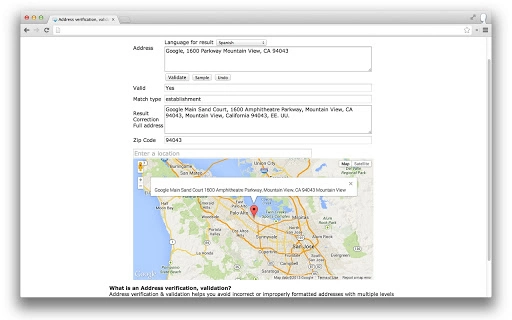
By integrating with Google Maps, the software enables users to visually verify locations, enhancing data reliability. It supports a wide range of countries and multiple languages, making it suitable for international operations. The tool also provides postal code lookup functionality, allowing users to quickly identify correct postal codes based on location inputs.
While the developer has not provided additional background information, the software's functionality suggests a focus on data accuracy and user efficiency. Real-world use cases include cleaning customer databases, validating shipping addresses, and preparing international mailing lists. The application is available as a free desktop utility for both Windows and Mac users.
Key Features & Capabilities
- Address Verification & Validation – Automatically checks and corrects address formats to ensure compliance with regional standards, reducing errors in data entry and processing.
- Multi-level Address Correction – Applies advanced correction logic to fix misspellings, missing components, and incorrect formatting across various address structures.
- Postal Code Lookup – Retrieves accurate postal codes for a broad range of countries, supporting international data management and compliance.
- Google Maps Integration – Marks verified addresses on Google Maps, providing visual confirmation of location accuracy and aiding in spatial data validation.
- Multi-language Support – Handles address inputs and outputs in multiple languages, enabling effective use across diverse linguistic environments.
These features are especially beneficial when managing customer data, preparing shipping manifests, or updating CRM systems. For example, a business processing orders from multiple countries can use the tool to standardize address formats before dispatch. Similarly, a data analyst working with global datasets can validate and enrich address fields efficiently. The integration with Google Maps enhances trust in location data, while multilingual support ensures usability across international teams. The tool’s ability to process large volumes of addresses makes it ideal for bulk data cleanup tasks.
User Interface, Workflow & Performance
The user interface is structured to support efficient data handling, with clear navigation between input, processing, and output stages. Users can enter addresses manually or import bulk data through supported file formats, though specific formats were not detailed. The workflow is designed to guide users through verification, correction, and validation steps in a logical sequence.
Interaction is expected to be responsive, though exact performance metrics such as CPU or RAM usage were not provided. The developer did not specify resource usage details, so performance may vary based on system configuration and data volume. Stability during processing is assumed to be consistent, given the software’s desktop application nature and targeted use case.
The interface supports real-time feedback during address validation, allowing users to identify issues immediately. Overall, the workflow appears optimized for productivity, minimizing user effort in correcting address data. Users can export validated results in standard formats, facilitating integration with other systems.
Compatibility & System Requirements
The software is compatible with both Windows and Mac operating systems, making it accessible to a wide range of users. It is available in version 1.0.0 and has an installation size of 25.5 MB, indicating a lightweight footprint. The developer did not provide additional system requirements, so exact hardware specifications such as processor speed, RAM, or disk space were not listed.
Compatibility information was partially provided, with no mention of specific OS versions or minimum hardware needs. Users are advised to ensure their systems meet general desktop application standards for smooth operation. The application is designed for desktop use and does not require cloud connectivity for core functionality.
However, Google Maps integration may require an active internet connection during use. The software supports both 32-bit and 64-bit systems, though this was not explicitly stated.
Pros and Cons
Pros
- Free to download and use, making it accessible for individual users and small businesses.
- Supports global address validation across multiple countries.
- Integrates with Google Maps for visual location verification.
- Offers multi-language support for international address handling.
- Lightweight installation size of 25.5 MB.
Cons
- Exact system requirements were not listed by the developer.
- Performance under heavy data loads was not specified.
- Limited information on supported file formats for bulk imports.
- No details on update frequency or future development roadmap.
- Developer background is not publicly available.
FAQ Section
Is the software compatible with Windows and Mac?
Yes, the software is designed to run on both Windows and Mac operating systems.
Does the tool require an internet connection?
While core validation functions may work offline, Google Maps integration requires an active internet connection during use.
Is the software safe to download and install?
Yes, the software is available as a free desktop application and is designed for secure use on personal and professional systems.
Can I use this tool for bulk address processing?
Yes, the software supports large-scale address validation and correction, making it suitable for bulk data management tasks.
What types of file formats are supported for import?
The developer did not specify supported file formats for bulk imports. Please refer to the official documentation or interface for details.
Final Thoughts + CTA
The Address Verification & Validation tool offers a practical solution for ensuring accuracy in address data across international borders. Its combination of multi-level correction, postal code lookup, and Google Maps integration makes it a valuable asset for professionals managing large datasets. The free pricing model increases its accessibility, while its lightweight design ensures minimal system impact.
Although some technical details such as system requirements and file format support are not fully disclosed, the tool’s core functionality is clear and well-targeted. It is especially beneficial for e-commerce businesses, logistics teams, and data management professionals who rely on precise address information. With strong multi-language support and global reach, it stands out as a reliable desktop utility.
Download Address Verification Tool now and enhance the integrity of your address data.
Download Address Verification Tool now







